Author: mjromeo81

Security from a DBA’s perspective
In security, there is no right or wrong; there is only conformance or non-conformance to agreed procedures.

Why Chris Hansen should be doing code reviews for your company
Another breathtaking excerpt from Thomas LaRock’s “DBA Survivor: Become a Rockstar DBA”.
Good code reviews are a necessary evil. They should be performed at regular intervals, perhaps at a project milestone or tollgate. Code reviews are a time for you to explain to your peers your thought process, as well as receive feedback on your code and design. The end result is better code, which results in a stabler system, which results in fewer production support issues. So why are most companies not bothering to do code reviews? Because everyone dreads code reviews.
Most people are not good at presenting. To make things worse, they know they are not good and that makes them even worse. Some people could be good, but get nervous when talking in front of a group of their peers. And those that are having their code reviewed feel as if they are being interrogated by Chris Hansen from “To Catch a Predator.” It all adds up to some of the most dreadful assemblies of employees you could ever hope to imagine. So we know code reviews are important, right? And we know that everyone dreads them, and as a result no one does them anymore, right? Now, I want you to imagine that Chris Hansen is leading the code review and you are the developer currently making your presentation.
CH: Do you know how old DTS is? What were you thinking? And you were not going to batch your transactions? Do you know what that will do to your log file?
You: I swear man, it was just talk, that’s all it was. I wasn’t going to do anything. I came here to tell my DBA that we needed to go our separate ways.
CH: Just talk? It’s a lot of talk. I’ve got the transcript right here. You say here, “I want to cursor through all your rows.” Man, that’s just wrong.
You: I know, I know. I’m getting help. The other day I bought a book on SQL Server 2008. And I am willing to do whatever I can to help you guys. Just tell me what you want me to do.
CH: Help us?
You: Yeah, with whatever.
CH: There’s the door. Go tell your friends we’re watching. And the next time they hand us deployment instructions that are more complicated than a NASA launch sequence, we’re coming after them.

What does a DBA have in common with the President?
Another TERRIFIC excerpt from Thomas LaRock’s book “DBA Survivor: Become a Rockstar DBA”. If you haven’t bought this book already, you need to cancel your Internet subscription.
Do you really have anything in common with the President? Yes. More than you probably realize. First, about half of the people around you doubt whether you are qualified to actually hold the job you have been given. Second, every time you make a decision or plot a course of action, you will constantly be criticized, even by your supporters. And third, you are going to be judged by what you accomplish in your first one hundred days, good or bad, even if it is not in your control. Every four years we elect a new President, and the person in office is always subject to approval ratings. You will have your own version of this fact of life; it is called your annual performance review. Come review time, you want your approval ratings to be as high as possible.

Luck, Preparation, and Opportunity
“Luck Is What Happens When Preparation Meets Opportunity”. This quote, attributed to Roman philosopher Seneca, reminds us that we make our own luck. The difference between lucky and unlucky people is all in our perspective.
Luck isn’t just about being at the right place at the right time, but also about being open to and ready for new opportunities. As Richard Wiseman’s ten-year study has shown:
Lucky people generate their own good fortune via four basic principles. They are skilled at creating and noticing chance opportunities, make lucky decisions by listening to their intuition, create self-fulfilling prophesies via positive expectations, and adopt a resilient attitude that transforms bad luck into good.
Landing a DBA job out of university I frequently remind myself “Boy am I lucky!!!”. But when I reflect back upon my own experiences, I remember how I attended those postgraduate database classes, how I was like a sponge soaking up everything possible. Over time I would get involved in the database community, read forums, contribute, etc. It got to the point where I visualising myself as a DBA. Fast forward a few months after graduation and along comes the opportunity – a Graduate DBA position.
Sometimes you make your own luck.

First Day DBA: Harsh Truths
Thomas LaRock (absolute legend) presents some harsh truths that any Graduate/Junior DBA must accept if they are to succeed as a Default Blame Acceptor…
First off, let’s get some basics out of the way. You do not know everything. Sorry to tell you, but better to find out now rather than later on. Trust me. No one person knows everything; it is a fact of human existence. You are human, right? Because that simple fact will be questioned periodically, so you better check again just to make certain. Last thing you want is to find out you are actually a Cylon or something worse.
Another thing you need to know about being a DBA is that you will have fewer friends at work than when you started. Now, that is not necessarily a bad thing. See, you have been placed into a position of responsibility, and with this responsibility you will need to make some decisions, and those decisions will not always be popular. Thus, you may lose some friends at work, but these losses will be more than offset by the gains you have in the overall DBA community. So you have that going for you, which is nice.
With that responsibility, you will also find that you start getting more blame than credit for your work. I promise you this: no one will ever stop by your desk in the morning and thank you for the fact that everything ran smoothly last night. But you better believe if a batch load took five minutes longer than expected, you will have four different people asking you “WTF?”
Based on my first three months as a Graduate DBA, these harsh truths are totally accurate. But ask any DBA if they would have it any other way 🙂

Is IT a Science/Engineering Discipline? Yes and No…
The following is an excerpt from Thomas LaRock’s FANTASTIC book “DBA Survivor: Become a Rockstar DBA”. It’s thought provoking and the message hits home once you have experience working in the industry.
Consider the standard university approach to training people in our discipline. Many colleges and universities offer a curriculum in “computer science,” encouraging their alumni with lucrative careers in “software engineering.” Yet, anyone who’s spent much time working with computer technology will tell you that these terms are often misleading. After all, any type of science is predicated upon the Scientific Method: characterize your observations and experiences, construct a hypothesis, predict a logical deduction, and test the hypothesis and prediction using one or more experiments. Does that sound like what information technologists and computer programmers do? Not just “no,” but “Heck No!” While it is certainly true that some computer technologists experiment (usually in the fields of processor design, networking technology design, security and encryption algorithms, and certain fundamental software technology platforms) this might represent 0.02 percent of the total information technology workforce around the world and frequently requires a doctoral degree.
Going a step further, let’s look at the term “software engineer.” While a full definition of the term “engineer” could fill a couple of paragraphs, the connoation of the word implies the application of knowledge in science and mathematics to solve a problem with predictable results whose operation and outcome can be reliably forecast. Engineers take their profession seriously and rest their credibility on producing designs that perform as expected without causing unintended harm to the public at large. Does that sound a lot like what you do? Does that sound like the jobs of anyone you know who work with IT?
It doesn’t sound like any IT professionals I know. While the IT profession has made many strides over the years and has greatly improved their ability to produce predictable results and reduce unintended consequences, we’re still subjected to daily hot fixes, software patches, and countless interruptions that disqualify computer programming and IT from consideration as both a science and an engineering discipline.

General SEO Principles
Getting Your Website on the First Page on Google
This will be a short and sweet post. Below I outline some good SEO principles to keep in mind when developing a website.
1. Understand what SEO actually is. Search Engine Optimisation (SEO) is the technique in which web developers design websites so that search engines have a greater chance to find and rank your site higher than the millions of other sites in response to a user’s search query.
2.Include the “alt” attribute for each individual image on your webpage. The ALT tag ensures that every image has a relevant textual representation within my website, therefore providing more valuable content to the search engine. Ensure that there is also good content surrounding the image on the page; a factor that the search engine algorithms consider.
3. Content is king. Include valuable and meaningful content on the actual pages so that the search engine algorithms can identify primary keywords and keyword phrases. Google (and other search engines) will lower your rank for trying to ‘trick’ the search engine, so avoid using techniques such as entering a bunch of unrelated of keywords in your website.
4. How long does your page take to load? Search engines like Google for example analyse the amount of time it takes too load your page. Search engines consider page size to be important due to the ever increasing number of users who choose to access the web via smartphone/tablet, etc. It is becoming increasingly rare that a user will solely depend on their wired PC connection at home to view pages on the Internet.
5. Utilize CSS as much as possible. CSS (Cascading Style Sheets) allows you to separate the content of the webpage from the display of the web page. This idea follows on from the aforementioned points about speed and ‘search engine friendliness’. By defining your styles once in a separate CSS style sheet, you can apply these styles to every page with one line of code. Not only is the code more ‘clean’ to the search engine, it also reduces the amount of code contained in each HTML document, therefore improving download speed.
Hope this helps!
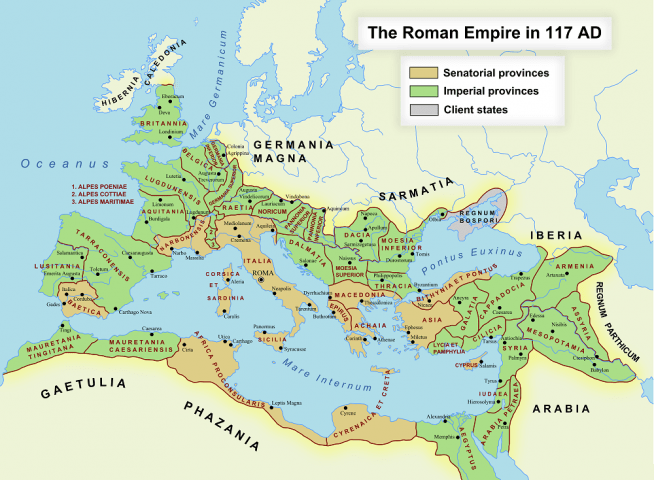
HTML Image Maps
The Beauty of Clickable Maps
Most of you are probably aware of HTML Image Maps. It’s where a standard HTML image has clickable sections that act as hyperlinks.
Here is an example that I whipped up a few years ago (on the homepage): http://homepage.cs.latrobe.edu.au/mj2romeo/assign/assign.php
The code is reproduced below:
<img src="map.png" alt="roman empire map 117AD" usemap="#empire" />
<map name="empire">
<area shape="rect" coords="362,403,431,424" alt="Rome" href="rome.html" />
<area shape="rect" coords="727,626,782,687" alt="Petra" href="petra.html" />
<area shape="rect" coords="831,396,884,445" alt="Armenia" href="armenia.html" />
</map>
You might be wondering how to determine the coordinates. For rectangles, you need to provide four coordinates. The horizontal position of the top-left corner, the vertical position (from the top of the image) of the top-left corner, the horizontal position of the bottom-right corner and the vertical position of the bottom-right corner.
Image maps can cause significant accessibility problems (and can be hard work to maintain), so you should restrict their use to places where they are really appropriate, such as (surprise) a map, where clicking on the parts of the map gives information about the relevant area. If you plan to make an image map out of a list of words just to make your navigation prettier, then you are using them for the wrong reason, and you should use a normal list styled with CSS.
Please note that you can also use different shapes as clickable areas besides rectangles (e.g. circles, polygons).

Simple PHP Hit Counter
No need for a service when you can do it for free!
On many pages it is common to have a generic hit counter displayed at the bottom of each page. Now it goes without saying that this is a very simple metric that arguably has zero intrinsic value. If a user spams F5 on your beloved homepage (or a sneaky web dev wants to impress his friends), this piece of code will just keep incrementing its value.
Of course, these days there’s tons of tools available to analyse web hits from various dimensions – hits by the country, unique hits, hits by second/day/month/year/etc.
Nevertheless, sometimes you just want to whip up a quick script with 0 effort.
The code is below:
// open file
$fp = fopen("hitcount.txt", "r");
$count = fread($fp, 1024); 		// grab current hit counter value
fclose($fp);
$count = $count + 1;			// close file and increment counter by 1

// Display the number of hits
echo "Page views: $count";

// write new counter vale to file
$fp = fopen("hitcount.txt", "w");
fwrite($fp, $count);
fclose($fp);
Enjoy!
 Auxiliary Memory - Mark Romeo's Oracle Blog